CUTE + NCCL Python Bindings for All!
September 23, 2026
Why this post
Admittedly, the topic seems a bit dry. Most Python programmers are blessed with never having to know how their function calls get mapped to underlying C code, and it’s easy to hand-wave and just know “this function I write is really just a wrapper over something else in a faster, lower-level language”. But my goal with this writeup is to peel back the curtain and show exactly how this happens, because it’s not as trivial as one might first think.
I’ve written two important and separate sections: Part 1 covers Cython, which is one of the most popular binding frameworks for mapping Python functions to C code. Part 2 covers what to do when your Python code needs to run on an accelerator (specifically a GPU, because those are by far the easiest to work with); this requires a different compilation/JIT pipeline that can get confusing quickly. Hopefully you’ll walk away with a better understanding of things!
Part 1: Cython
It’s important to start by thinking about how one programs in Python. I really like John Ousterhout’s assertion that Python is a “glue” language: when possible we prefer to defer the most computationally expensive parts of our code to something lower level like C, and then stitch/compose them together in a higher-level language that’s extremely human-readable. AFAIK there’s some controversy around this characterization, but I would argue most people who learn programming follow this paradigm, at least to start with.
When you’re programming in Python, you typically import some_module to use a function that you have not already defined in the file. Under the hood, your system and interpreter locate these library “modules” (referring to a single .py file) or “packages” (referring to a defined set of .py files) in a hierarchichal way.
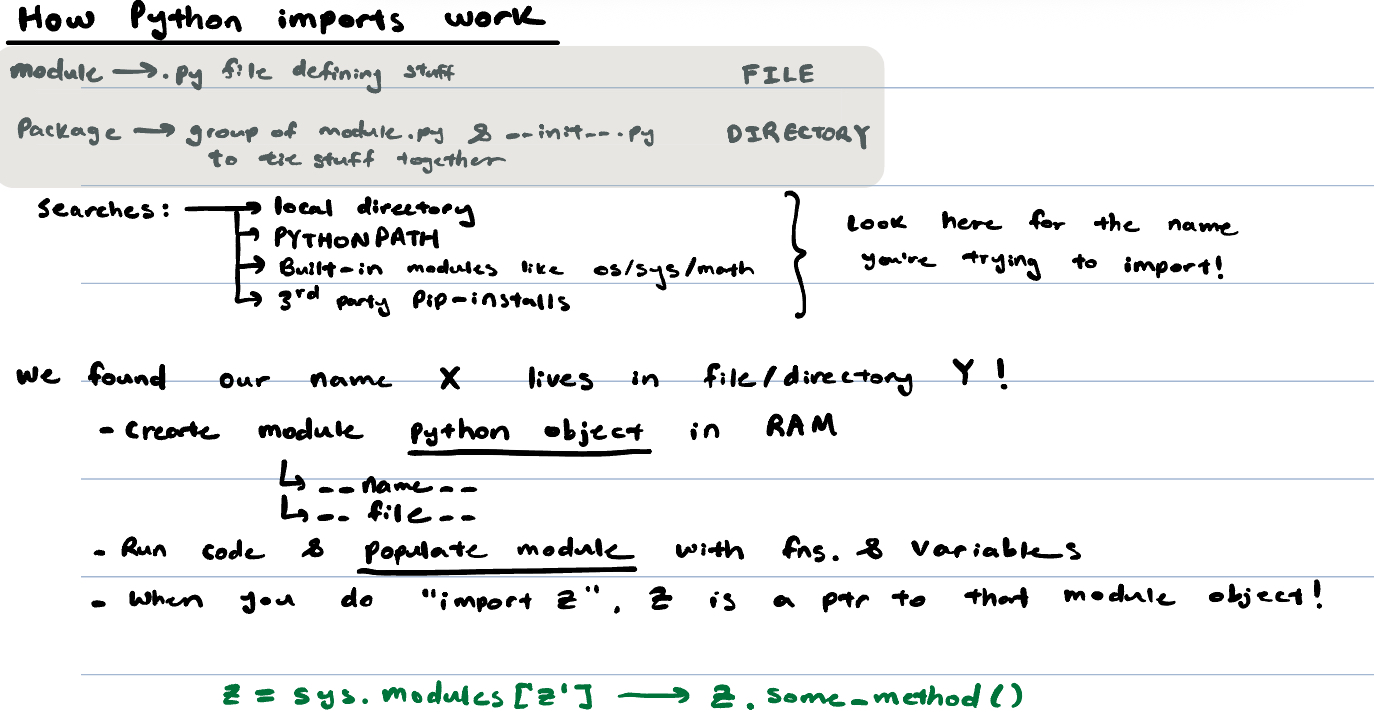
In this example, I’m going to use NVIDIA’s CuTe-DSL and NCCL integration as my main example. Thanks to Python’s existing import infrastructure, you can import different modules and write code that looks like the following:
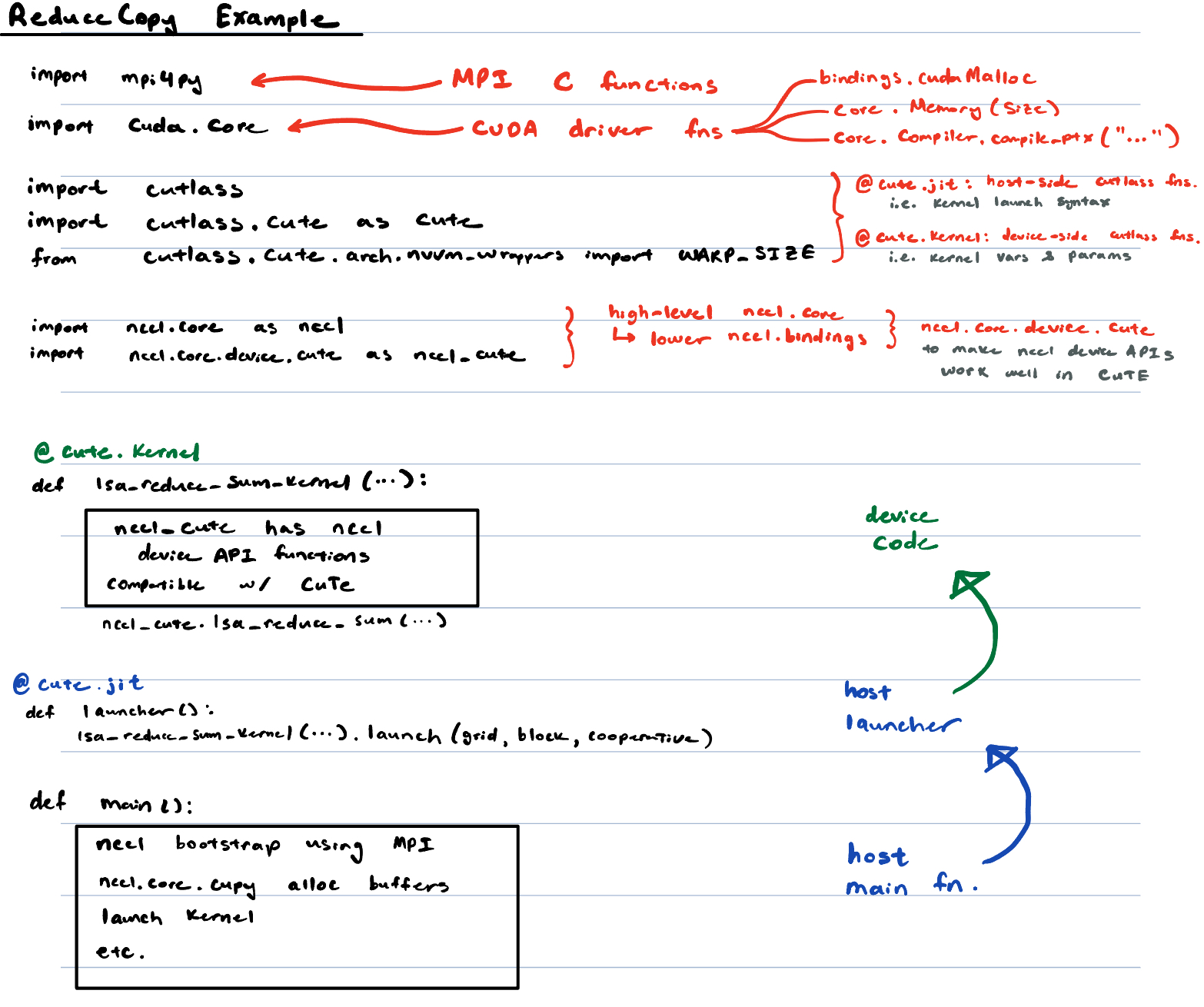
Important things to note in the above example: there are 3 categories of functions shown. One is the main() function, which runs on your traditional host with no issues. Another is a CuTe launcher function, which again runs on the host, but invokes a special method that launches a kernel. The final one is the CuTe kernel itself: all the code for that runs on the GPU with no CPU involvement at all. You’ll notice at the top of the image, there are a bunch of imports that do different things: we import tons of different functions that either run on the CPU or GPU, need to touch the CUDA driver or not, etc.
For now, like I said before, let’s just focus on the CPU-side of things. Each of the functions that runs on the CPU here used to be defined in C, hence each function has two forms, a “Python-form” and “C-form”. We use a special framework called Cython to conver between the two; Cython is a “binding” layer which means that its core job is to convert Python-form function arguments to C-form funciton arguments. That’s it!
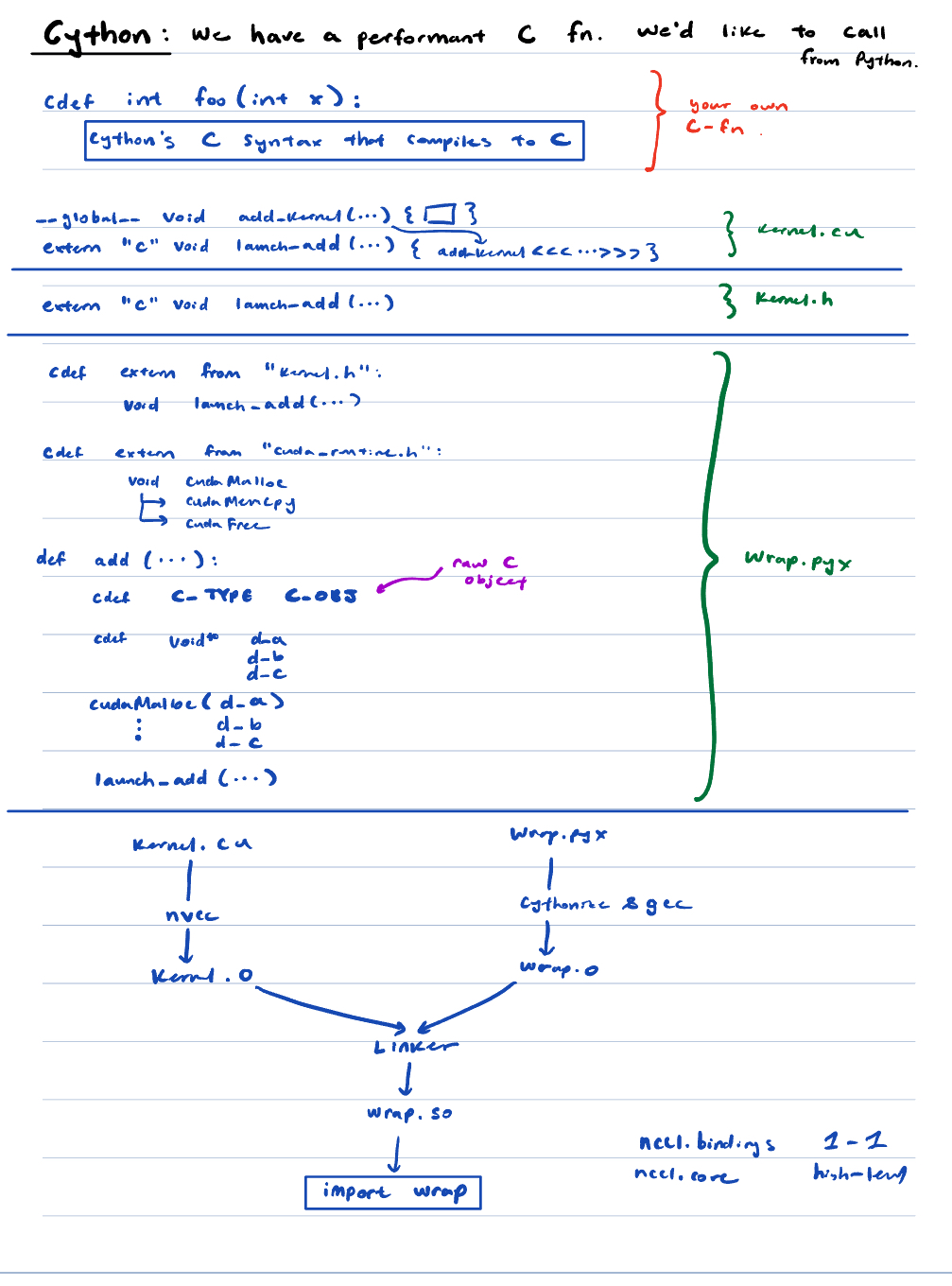
The image above looks like a lot, but it’s really just Cython’s syntactic sugar that it uses to define this translation. These “bindings” live in .pyx and .pyd files which you can think of as analagous to implementation and header files respectively. But once you define these translation rules, you can use a fairly standard gcc compilation pipeline to “cythonize” all of the functions you care about into a .so, which python can dlopen when you import a new module.
If you study the nccl4py bindings, you can see this structure very clearly:
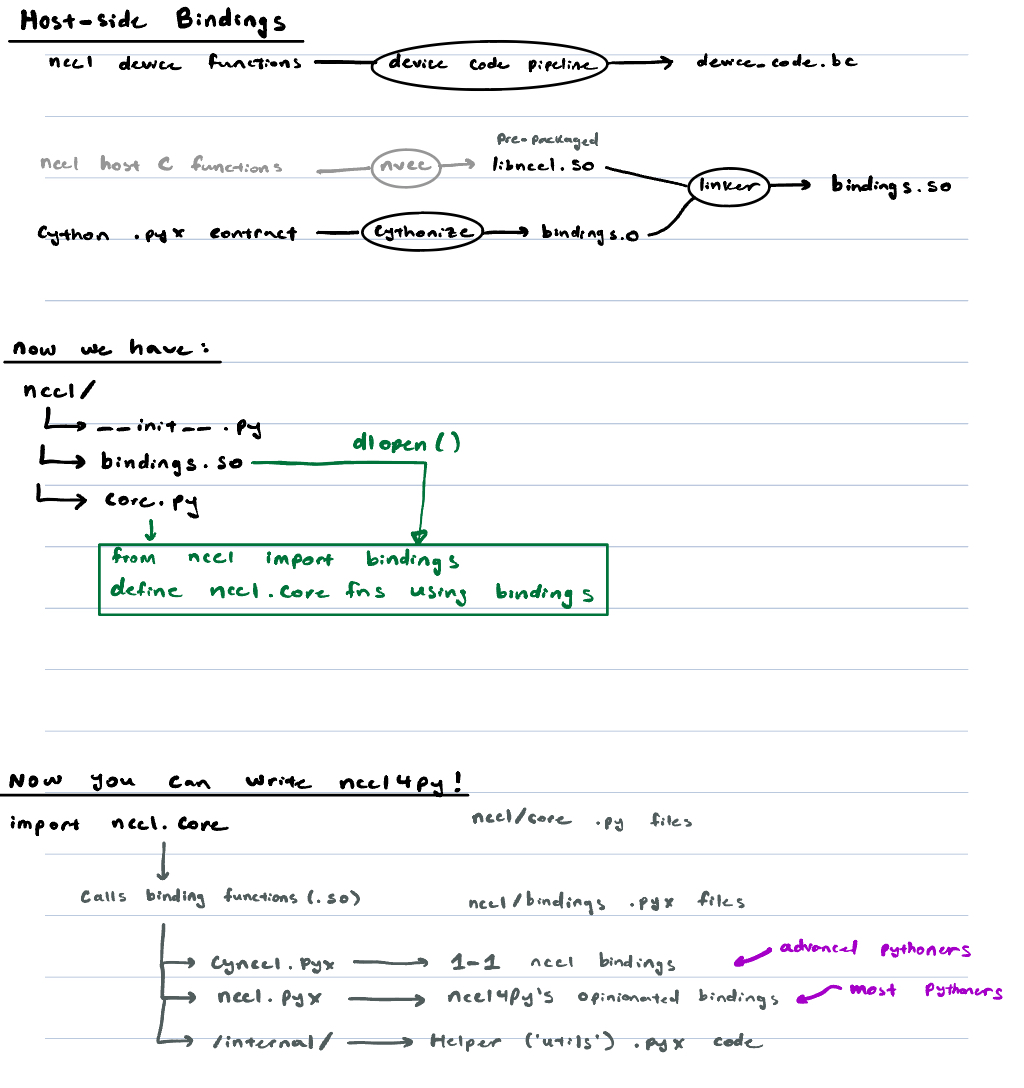
So in a nutshell: to create C-Python bindings, just define your rules in a Cython .pyx!
Part 2: Device Code
Device code is a bit different:
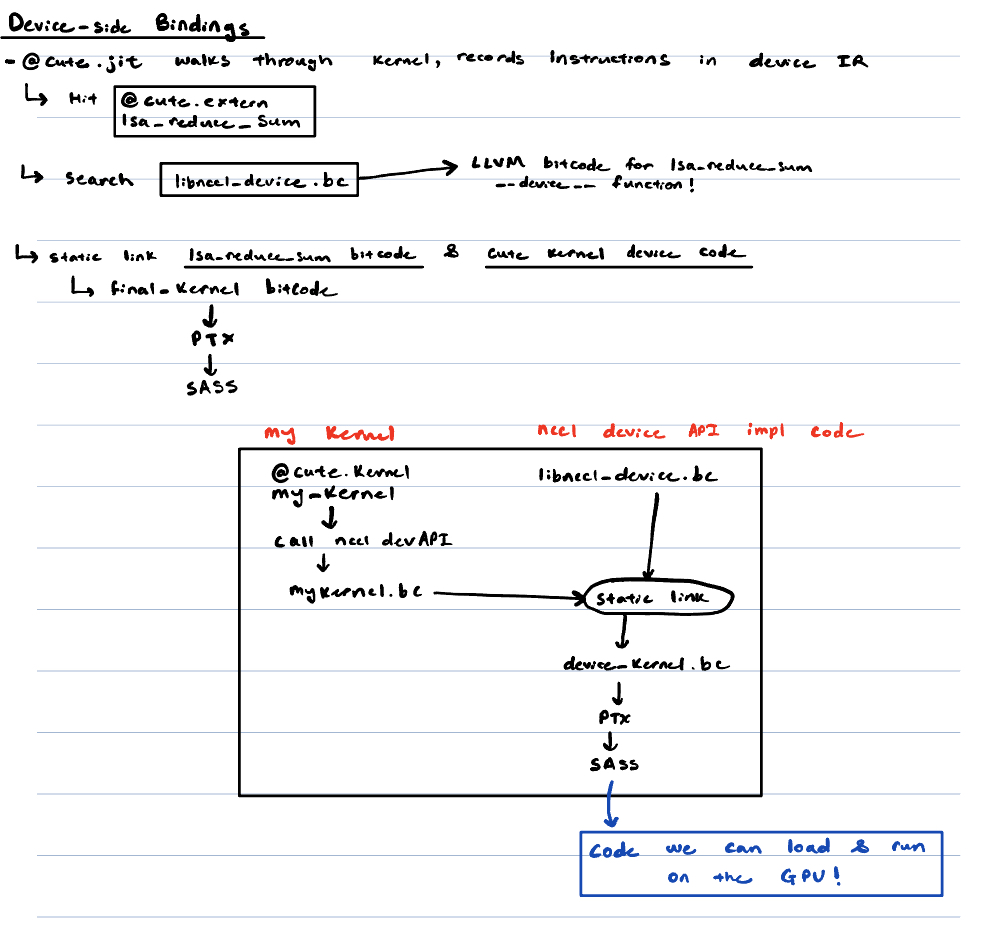
The core issue is that functions that run on the GPU use their own special instruction set, which is represented in PTX/SASS. In our case, we care about compiling the instructions down to an IR like LLVM-IR or LTO-IR. In CuTe-DSL, the @cute.jit compiler walks through the kernel and fills in your @cute.extern stubs with the function implementation, which is typically located in the libnccl_device.bc that comes packaged with your NCCL installation. Using this, you can retrieve the bitcode, and hence the PTX/SASS you need! Walk through the compilation pipeline and stages yourself, as a practice.
Review
This is what the full binding and compilation pipeline looks like for adding a new NCCL device API to CuTe:
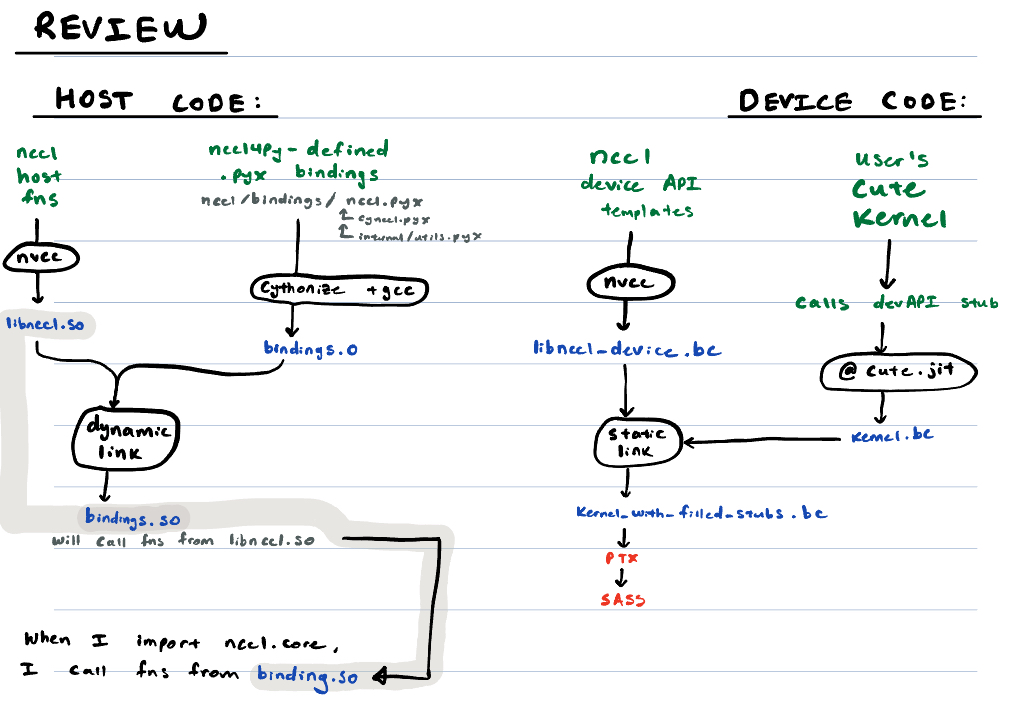
Green marks things that we wrote ourselves, and thus we can control or modify as needed. Circles indicate specific toolchain programs. Blue indicates code/instruction artifacts that are produced as a result of compiling the things in green.
Hope this helped clarify how CuTe and NCCL device APIs interact! It can get confusing fast juggling code that exists on CPUs/GPUs/XPUs, so hopefully this made that process a little easier.